> For the complete documentation index, see [llms.txt](https://docs.chatlayer.ai/llms.txt). Markdown versions of documentation pages are available by appending `.md` to page URLs; this page is available as [Markdown](https://docs.chatlayer.ai/chatlayer-documentation-pt-br/navegacao/tables.md).

# Tabelas

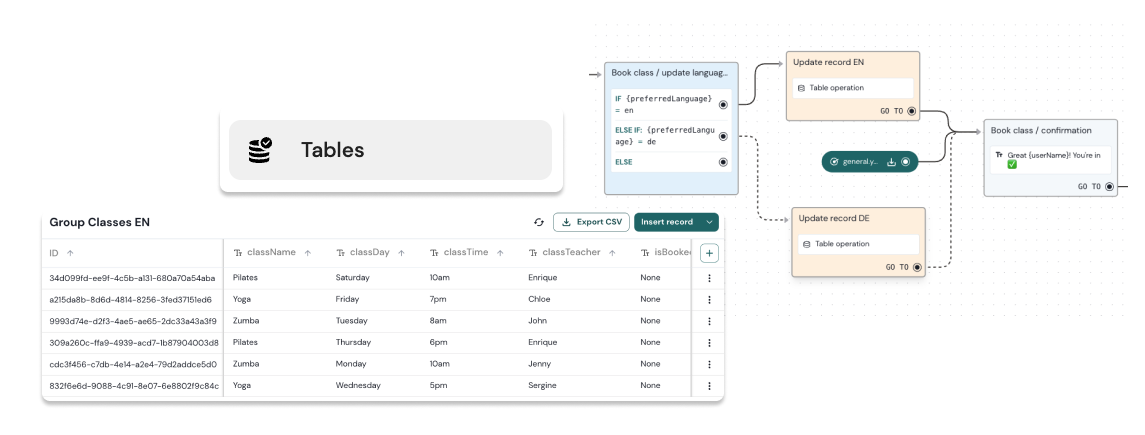
O Chatlayer permite a integração de bancos de dados incorporados semelhantes a planilhas. Essas Tabelas podem armazenar diversos dados como registros, preenchendo colunas com valores correspondentes.

<figure><img src="/files/f75bdfb0a038e7db818057f2bf96e303fd07cda9" alt=""><figcaption></figcaption></figure>

{% hint style="danger" %}
Observe que Tabelas não podem ser exportadas em[ exportação do bot](/chatlayer-documentation-pt-br/navegacao/settings/import-export.md) ainda.
{% endhint %}

## Comece com Tabelas

<table data-view="cards"><thead><tr><th></th><th></th><th></th><th data-hidden data-card-target data-type="content-ref"></th><th data-hidden data-card-cover data-type="files"></th></tr></thead><tbody><tr><td><strong>Crie uma Tabela com registros</strong></td><td>O básico para criar sua primeira tabela.</td><td></td><td><a href="/pages/9b319e39b910b227b05569499a1df1eee29f3f01">/pages/9b319e39b910b227b05569499a1df1eee29f3f01</a></td><td><a href="/files/375408899c32bb2064eeeac0a927a9b64ed1b908">/files/375408899c32bb2064eeeac0a927a9b64ed1b908</a></td></tr><tr><td><strong>Tipos de coluna</strong></td><td>Os diferentes tipos de dados que sua Tabela pode armazenar.</td><td></td><td><a href="/pages/71459e13998d458a0f03e1ef5c923a3643b99af0">/pages/71459e13998d458a0f03e1ef5c923a3643b99af0</a></td><td><a href="/files/91ee2c005cc17d40f97c18b50fc3363f57fe56a6">/files/91ee2c005cc17d40f97c18b50fc3363f57fe56a6</a></td></tr><tr><td><strong>Modelo de bot de academia</strong></td><td>Um modelo de bot que usa Tabelas para armazenar informações de aulas.</td><td></td><td><a href="/pages/bc6f1799960416da15ee2244c23a57ddfd61c723#gym">/pages/bc6f1799960416da15ee2244c23a57ddfd61c723#gym</a></td><td><a href="/files/667603da6daa837c371499239e6c5aaf073b5593">/files/667603da6daa837c371499239e6c5aaf073b5593</a></td></tr><tr><td><strong>Opere em seus registros</strong></td><td>Insira, atualize, exclua e recupere dados.</td><td></td><td><a href="/pages/419d9cf980f4670fbe574bf6a9f746d2a5306df6">/pages/419d9cf980f4670fbe574bf6a9f746d2a5306df6</a></td><td><a href="/files/6c076013dcf6765e3ea62a3616afa5e9db539c22">/files/6c076013dcf6765e3ea62a3616afa5e9db539c22</a></td></tr></tbody></table>

<details>

<summary>Melhores práticas para Tabelas</summary>

Aqui estão algumas boas práticas ao gerenciar suas Tabelas:

* Planeje sua[ lógica do fluxo ](/chatlayer-documentation-pt-br/buildabot/conversation-design/getting-started.md)publicado primeiro.
* Mantenha a estrutura dos seus dados simples.
* Valide os formatos dos seus dados antes da inserção para evitar erros.
* Use IDs únicos por registro para facilitar a recuperação dos dados.
* Otimize a recuperação de dados usando consultas precisas para evitar buscar dados extras.
* Implemente estratégias de tratamento de erros.
* Verifique e limpe seus dados regularmente.
* Priorize a segurança e a privacidade.
* Teste minuciosamente antes da implantação.
* Monitore e faça iterações após a implantação.

</details>

## Vá além

<table data-view="cards"><thead><tr><th></th><th></th><th></th><th data-hidden data-card-target data-type="content-ref"></th><th data-hidden data-card-cover data-type="files"></th></tr></thead><tbody><tr><td><strong>API</strong></td><td>Conecte sua Tabela à sua API.</td><td></td><td><a href="/pages/3be6b775ab62bfa60091476cc3164c301aff9d41">/pages/3be6b775ab62bfa60091476cc3164c301aff9d41</a></td><td><a href="/files/eac6872f26bf5c760c30eb97cb4671a190b91c14">/files/eac6872f26bf5c760c30eb97cb4671a190b91c14</a></td></tr><tr><td></td><td><strong>Use Tabelas para armazenar suas perguntas de KBAI</strong></td><td>Fique de olho em como seu KBAI está performando.</td><td><a href="/pages/062d5937a6e1b1b87781eed3f1bf3b32beda91e2">/pages/062d5937a6e1b1b87781eed3f1bf3b32beda91e2</a></td><td><a href="/files/11400d59477266af6e0b4f6b3a03630a3d97b144">/files/11400d59477266af6e0b4f6b3a03630a3d97b144</a></td></tr><tr><td></td><td></td><td></td><td></td><td></td></tr></tbody></table>


---

# Agent Instructions
This documentation is published with GitBook. GitBook is the documentation platform designed so that both humans and AI agents can read, navigate, and reason over technical content effectively. Learn more at gitbook.com.

## Querying This Documentation
If you need additional information that is not directly available in this page, you can query the documentation dynamically by asking a question.

Perform an HTTP GET request on the current page URL with the `ask` query parameter, and the optional `goal` query parameter:

```
GET https://docs.chatlayer.ai/chatlayer-documentation-pt-br/navegacao/tables.md?ask=<question>&goal=<endgoal>
```

`ask` is the immediate question: it should be specific, self-contained, and written in natural language.
`goal` is optional and describes the broader end goal you are ultimately trying to accomplish on behalf of the user. GitBook uses it to tailor the answer towards what is most useful for that goal.

The response will contain a direct answer to the question and relevant excerpts and sources from the documentation.

Use this mechanism when the answer is not explicitly present in the current page, you need clarification or additional context, or you want to retrieve related documentation sections.