> For the complete documentation index, see [llms.txt](https://docs.chatlayer.ai/llms.txt). Markdown versions of documentation pages are available by appending `.md` to page URLs; this page is available as [Markdown](https://docs.chatlayer.ai/chatlayer-documentation-pt-br/navegacao/bot-builder/flows.md).
# Fluxos
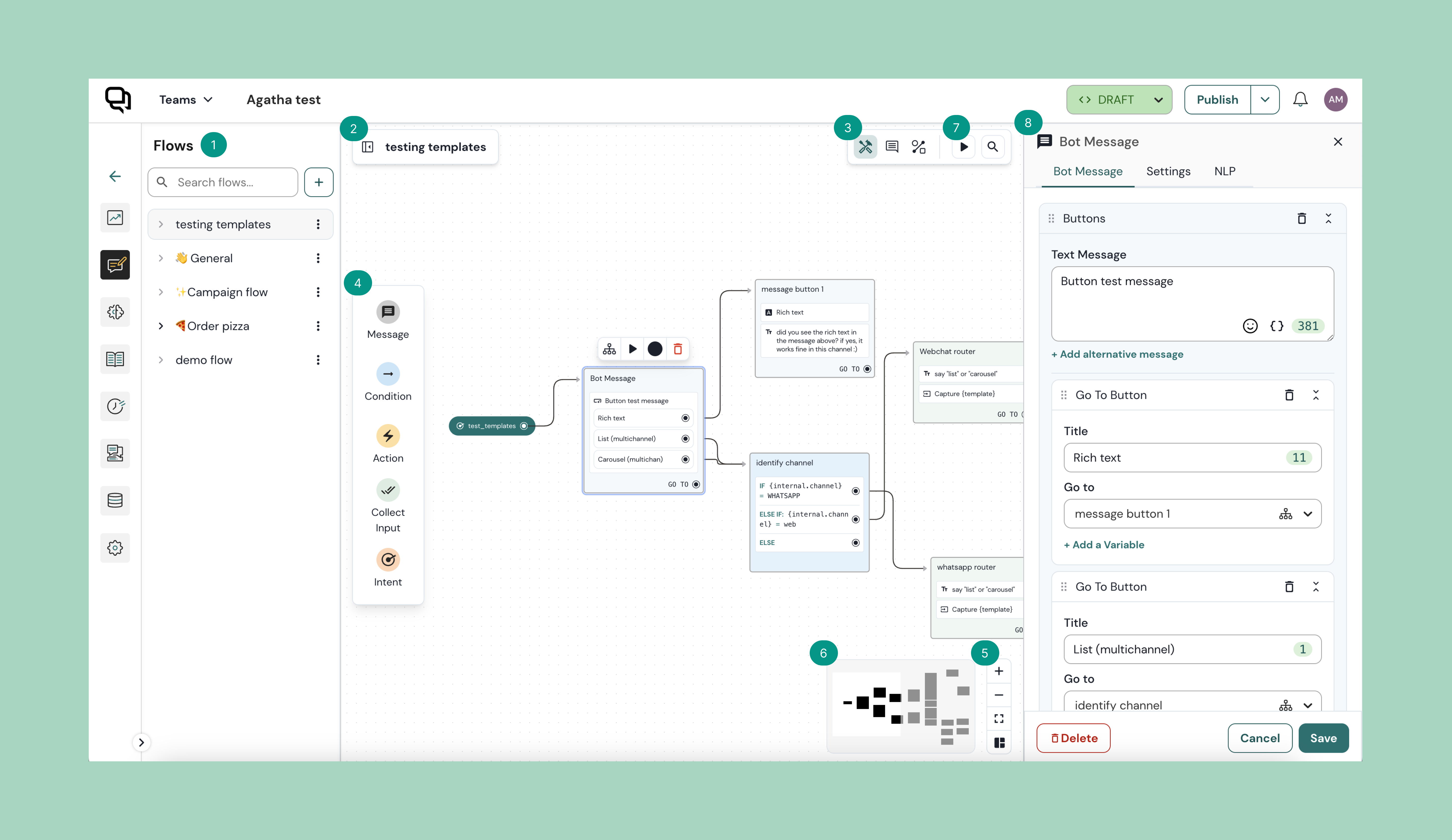
A visualização de Fluxos é onde você constrói a lógica do seu bot em uma tela flexível, junto com uma visão dos diferentes fluxos de conversa.
1. **Barra lateral de fluxos**
Organize e gerencie seus fluxos de conversação de forma fluida usando 'Flows'
2. **Navegação**
Mantenha-se informado sobre a localização atual do seu fluxo com um indicador visual claro. Além disso, alterne perfeitamente entre subfluxos e o principal para uma navegação fluida
3. **Barra de ferramentas**
A barra de ferramentas é composta por uma variedade de ferramentas e funções:
* **Modo de construção:** Durante o processo de edição do seu fluxo, o 'modo de construção' estará ativado.
* **Modo de comentário:** Por **e**abilitando o modo de comentário, você poderá deixar um comentário na tela.
* **Pesquisar:** Pesquise tipos específicos de bloco simplesmente clicando no botão de ícone e digitando o nome do bloco ou bloco de intenção desejado
4. **Blocos e intenções**
Crie o fluxo de conversação do seu bot sem esforço, bastando clicar e arrastar o bloco ou os blocos de intenção desejados para a tela.
5. **Opções de visualização**
Você tem várias opções:
* **Aumentar zoom:** aproxime para ver melhor
* **Diminuir zoom:** afaste para ver o panorama geral
* **Layout automático:** use a funcionalidade de layout automático para evitar que seus blocos apareçam empilhados
6. **Minimapa**
Clique e arraste no minimapa para navegar facilmente pela tela sem perder sua posição
7. **Teste seu bot**
Para testar como seu bot interagirá com os clientes finais, você pode usar este recurso para testar seu bot.
8. **Layout automático**
Use a funcionalidade de layout automático para evitar que seus blocos apareçam empilhados
## \[VÍDEO] Introdução à nova tela
Prefere assistir a um vídeo? Confira nosso tutorial em vídeo de 3 min 👇
{% embed url="" %}
## Saiba mais
Nos próximos artigos, você aprenderá a:
{% content-ref url="/pages/26c63db1d58511dc8b634a64a6bbe334932d24cb" %}
[Funcionalidades da tela](/chatlayer-documentation-pt-br/navegacao/bot-builder/flows/canvas-functionalities.md)
{% endcontent-ref %}
{% content-ref url="/pages/c307eff15fc048bbabaad081b8fe7cf0660f2ab0" %}
[Colabore com membros da equipe](/chatlayer-documentation-pt-br/navegacao/bot-builder/flows/collaborate-with-team-members.md)
{% endcontent-ref %}
{% content-ref url="/pages/165c0b103ed2e3dbca14360139d47de67ad6fd58" %}
[Gerencie seus fluxos](/chatlayer-documentation-pt-br/navegacao/bot-builder/flows/manage-your-flows.md)
{% endcontent-ref %}
---
# Agent Instructions
This documentation is published with GitBook. GitBook is the documentation platform designed so that both humans and AI agents can read, navigate, and reason over technical content effectively. Learn more at gitbook.com.
## Querying This Documentation
If you need additional information that is not directly available in this page, you can query the documentation by asking a question.
Perform an HTTP GET request on the following URL with the `ask` and `goal` query parameters:
```
GET https://docs.chatlayer.ai/chatlayer-documentation-pt-br/navegacao/bot-builder/flows.md?ask=&goal=
```
`ask` is the immediate question: it should be specific, self-contained, and written in natural language.
`goal` is what the user is ultimately trying to achieve, the reason they need the answer. Sharing it helps GitBook give you a better, more relevant answer. A goal is most helpful when it describes the outcome the user wants rather than restating the question. For example, with `ask=how do I create an API token`, a goal like `automate deployments from our CI pipeline` lets GitBook tailor the answer to that use case.
The response will contain a direct answer to the question and relevant excerpts and sources from the documentation.
Use this mechanism when the answer is not explicitly present in the current page, you need clarification or additional context, or you want to retrieve related documentation sections.