> For the complete documentation index, see [llms.txt](https://docs.chatlayer.ai/llms.txt). Markdown versions of documentation pages are available by appending `.md` to page URLs; this page is available as [Markdown](https://docs.chatlayer.ai/chatlayer-documentation-pt-br/buildabot/conversation-design.md).
# Design de conversa
Design de conversa é o ato de criar e manter chatbots, ou agentes conversacionais automatizados. O Chatlayer permite que você faça isso sem precisar de habilidades de programação.
## Chatbot
Um chatbot (ou *bot*) é um agente conversacional automatizado que usa inteligência artificial para entender e responder às solicitações dos clientes em linguagem humana. Ele pode assumir a forma de um bot que escreve para os clientes via chat (*chatbot*) ou um que fale com eles por meio de uma ligação telefônica (*voicebot*), embora chatbot seja o termo comumente aceito para ambos.
Um chatbot de varejo em ação.
Chatbots são uma ótima ferramenta que permite que sua empresa automatize tarefas simples, como responder às perguntas frequentes, obter os dados de contato de um cliente ou redirecioná-lo ao agente de suporte certo. Assim, com a ajuda do chatbot, sua equipe pode se concentrar nas tarefas importantes!
A Chatlayer permite que você crie seu bot sem nenhum conhecimento de programação, de forma amigável e intuitiva. Você pode usar um modelo que pode ajudar a começar mais rapidamente ou criar um bot do zero. De qualquer forma, configurar um chatbot básico levará apenas alguns minutos.
## Design de conversas
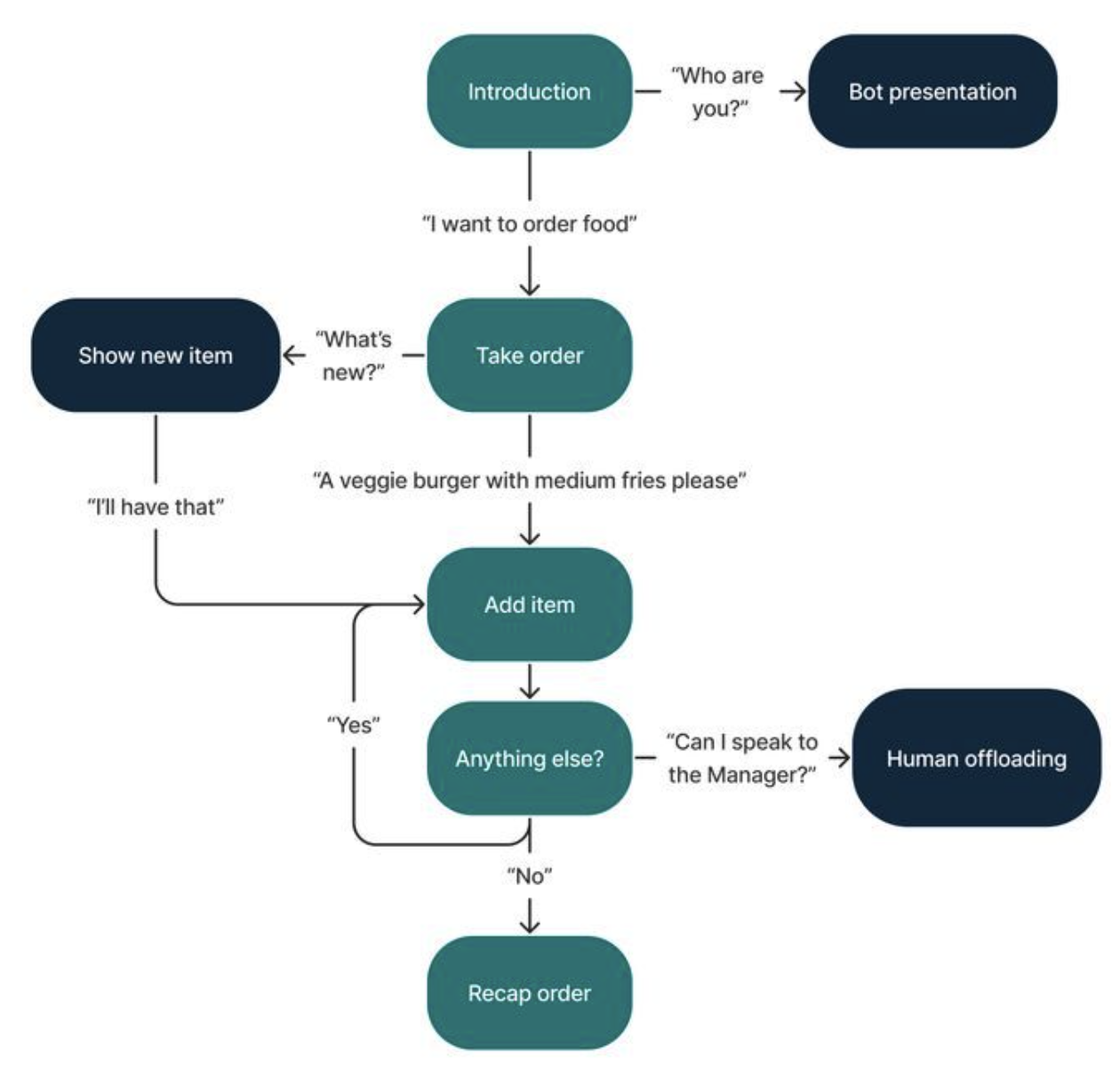
Projetar a forma como um chatbot conversa é chamado de design de conversação. É uma combinação de tecnologia, psicologia e linguagem que leva em consideração tanto as limitações quanto as possibilidades humanas e tecnológicas para criar a experiência de usuário conversacional mais intuitiva possível.
Exemplo de um fluxograma de design de conversação.
Em outras palavras, design de conversação trata de criar conversas entre humano e máquina que pareçam o mais naturais possível.
Projetar um chatbot é um fluxo de trabalho passo a passo que os designers de conversação vão refinando.
{% content-ref url="/pages/96098a85ff7c33b0d46730d3b6fe531177163c11" %}
[Planeje seu bot](/chatlayer-documentation-pt-br/buildabot/conversation-design/getting-started.md)
{% endcontent-ref %}
{% content-ref url="/pages/605762e049a741f7cf5b9b7cb16d76fb60cd4b02" %}
[Fluxo de trabalho de design de conversa](/chatlayer-documentation-pt-br/buildabot/conversation-design/conversation-design-workflow.md)
{% endcontent-ref %}
{% content-ref url="/pages/bfefdeda080145435bce600661cff268254b6486" %}
[Broken mention](broken://pages/bfefdeda080145435bce600661cff268254b6486)
{% endcontent-ref %}
---
# Agent Instructions
This documentation is published with GitBook. GitBook is the documentation platform designed so that both humans and AI agents can read, navigate, and reason over technical content effectively. Learn more at gitbook.com.
## Querying This Documentation
If you need additional information that is not directly available in this page, you can query the documentation by asking a question.
Perform an HTTP GET request on the following URL with the `ask` and `goal` query parameters:
```
GET https://docs.chatlayer.ai/chatlayer-documentation-pt-br/buildabot/conversation-design.md?ask=&goal=
```
`ask` is the immediate question: it should be specific, self-contained, and written in natural language.
`goal` is what the user is ultimately trying to achieve, the reason they need the answer. Sharing it helps GitBook give you a better, more relevant answer. A goal is most helpful when it describes the outcome the user wants rather than restating the question. For example, with `ask=how do I create an API token`, a goal like `automate deployments from our CI pipeline` lets GitBook tailor the answer to that use case.
The response will contain a direct answer to the question and relevant excerpts and sources from the documentation.
Use this mechanism when the answer is not explicitly present in the current page, you need clarification or additional context, or you want to retrieve related documentation sections.